
Orange County Register
MediaNews Group, Inc.News & Magazines
2.3101.00 Reviews
- Version
- 10.0.60
- Installs
- 10.00K
- Age Rating
- Everyone
Screenshots







Our Review of Orange County Register
 Analysis by Appyee
I approached Orange County Register as a reader who wants local news without turning the process into a daily technical chore. It is a free News & Magazines app from MediaNews Group, Inc., built around the Orange County Register rather than a broad national news feed. That focus is its main reason to exist: if Orange County stories are part of your routine, a dedicated publication app can feel more direct than searching through a general news service.
My overall impression is mixed. The app can be useful when I want the Register’s coverage in one place, but the experience depends heavily on whether the installation, account access, and content loading behave smoothly on a particular device. Its average rating is 2.3 from around 200 ratings, which is a warning that the practical experience has not been consistently easy for everyone. I would not dismiss it solely for that reason, but I would approach it with realistic expectations.
Where the reading experience can become frustrating
The first thing I would tell a friend is that this is not a general-purpose news reader. The short description identifies it simply as Orange County Register, and that matters when deciding whether it belongs on your phone. You are choosing a publication-specific destination, not an app designed to combine many newspapers, broadcasters, magazines, and topic feeds.
That narrow focus is valuable for a local reader. Instead of opening a broad aggregator and filtering away national headlines, I can go directly to the publication associated with Orange County coverage. It is especially sensible for people following local government, community developments, regional business, traffic-related news, sports, or neighborhood issues. For someone who only wants occasional headlines from many different places, a general news app may be more convenient.
One likely point of friction is figuring out what the app is expected to provide after installation. A publication app may be free to download while some reading access can involve an in-app purchase. Here, the app is listed as free, with in-app purchase items ranging from about fifteen dollars to over one hundred seventy dollars per item. I would therefore treat the download price and the cost of extended access as separate questions before committing to any payment.
This distinction is important in everyday use. A reader may install the app expecting every article to be immediately available because there is no upfront charge, then encounter a purchase prompt and assume the app is malfunctioning. That is not automatically a technical failure. It is a sign to pause, read the wording on the screen, and decide whether the available access matches the way you intend to use the publication.
The app is marked for Everyone, which makes it broadly suitable from an age-rating perspective. That label does not guarantee that every article will suit every reader’s preferences, nor does it explain how access works. I would still judge it by the type of local reporting I want and by whether the reading process feels comfortable on my phone.
What I would check before blaming the app
When a news app appears empty, slow, or stuck, I start with the simplest checks. I confirm that the phone is connected to the internet, then try another ordinary webpage or app. If everything else is also struggling, the problem is probably the connection or the device rather than Orange County Register itself.
I also check whether the app is running on a supported system. The listed minimum operating system is version 8.0, so an older device below that requirement is not a good candidate. On a compatible phone, I would still make sure the operating system and the app are reasonably current. The current app version is 10.0.60, and keeping software updated is a sensible first step when screens fail to load or an app closes unexpectedly.
Storage is another overlooked check. News apps handle changing article content, images, and temporary files, and a phone that is nearly full can behave unpredictably. I would free a little space before reinstalling anything. This is more useful than repeatedly tapping a refresh control while the device has no room to work.
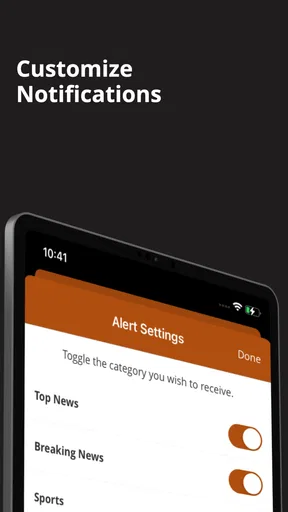
Notifications deserve a practical decision rather than an automatic approval. If I want breaking local updates, alerts may be useful. If I mainly read at a quiet time, I would keep notifications limited so the app does not become a distraction. The important point is to choose based on my reading habit, not to assume that every available setting improves the experience.
A calmer setup routine
My preferred setup is deliberately simple. I install the app, open it while connected to a reliable network, and look at the first screen without rushing through prompts. I note whether the app asks me to sign in, offers reading access directly, or presents a purchase option. I do not enter payment details until I understand what the transaction is intended to unlock.
If I already have a relationship with the Orange County Register, I would use the same account details associated with that relationship rather than creating several new accounts. Multiple sign-ins are a common source of confusion: a reader may pay or subscribe through one identity and then open the app with another. Keeping the account path consistent makes later troubleshooting much easier.
I would also test the basic reading path before customizing anything. Can I open a story, return to the previous screen, and find the publication’s main sections again? If those simple actions work, I know the core installation is functioning. If they do not, changing unrelated settings is unlikely to help.
For a household device, I would make sure the person who intends to use the app is the one completing the access setup. This avoids a situation where one family member begins the process, another uses the phone later, and nobody is sure which account or purchase status the app is displaying.
One useful habit is to record the exact wording of an error or access message before closing it. A vague memory such as “it would not open” is difficult to act on. A short note about whether the problem appeared during launch, sign-in, article loading, or payment gives a much clearer starting point if support is needed.
Recovering a broken reading workflow
When the app stops behaving normally, I troubleshoot in stages rather than deleting it immediately. First I close and reopen it. Then I check the connection and try a different article or section. If one story fails but other content opens, the issue may be limited to that item or its loading path. If every screen fails, I move on to the device and app checks.
Restarting the phone is basic, but it is worthwhile after an update or a long period of use. It clears temporary problems without changing account information. I would do this before reinstalling, especially if I have already completed a sign-in or purchase process that I do not want to repeat unnecessarily.
If the app opens but appears to show outdated content, I would avoid assuming that the publication has stopped updating. I would refresh once, move between sections, and test the same connection in another app. Local news publishing can also have natural pauses between updates, so a quiet screen is not automatically evidence of a broken feed.
Sign-in trouble needs a separate approach. I would carefully check the account details, watch for accidental spaces, and confirm that I am using the account connected to my access. If a password reset is available through the normal account process, I would use that rather than repeatedly guessing. Repeated failed attempts can make the situation feel worse without providing new information.
Purchase-related confusion is another area where patience matters. I would read whether the screen is offering a one-time item, a recurring access arrangement, or another form of paid content before confirming anything. The listed purchase range is wide, from about fifteen dollars to more than one hundred seventy dollars, so the wording deserves attention. A reader who only wants to sample local coverage should not rush into the highest-priced option.
If reinstalling becomes necessary, I would first make sure I know the account details needed to return to the app. Reinstallation can resolve damaged local files, but it can also remove locally stored settings or require the user to sign in again. I see it as a later step, not the first response to every loading delay.
There is also a useful distinction between an app problem and a content problem. If the interface loads but a particular article does not, switching networks and trying again later may be more sensible than resetting the entire installation. If the whole app crashes immediately, updating, restarting, and checking compatibility become more relevant.
When the app is not the cause
News access can fail for reasons outside the app itself. A weak home Wi-Fi signal, a crowded public network, a restrictive workplace connection, or a temporary mobile data issue can all make an article appear unavailable. I test with another connection when possible. If the same page works elsewhere, I have learned something useful before changing the app.
Device age can matter even when the operating system technically meets the minimum. Older hardware may take longer to display image-heavy pages or may close apps when memory is limited. In that situation, a lightweight mobile website or a simpler reading method may be a better fit than repeatedly forcing the app to reload.
Account status is another external factor. If I can open the app but cannot access material I expected to have, I check whether I am signed into the correct account and whether the access arrangement is still active. I do not treat every paywall or locked article as a crash. The app can be working exactly as designed while my access needs clarification.
It is also worth comparing behavior across devices. If the app works on one compatible phone but not another, the difference may be local storage, operating-system condition, network settings, or background restrictions. That comparison is more informative than relying only on the overall rating. The app has over ten thousand installs, but that broad figure cannot predict how it will behave on one particular handset.
For people who mainly want headlines, the app may be more than they need. A browser bookmark can be quicker for checking one story, while a general aggregator can be better for comparing coverage from several publishers. The dedicated app makes the most sense when the Orange County Register itself is the publication I intend to follow repeatedly.
How I would use it during a normal day
Imagine I live in or near Orange County and want a short local-news check before work. I would open the app on a reliable connection, scan the publication’s available sections, and select only the stories relevant to my day. If an article requires paid access, I would decide whether the story justifies that commitment rather than treating the prompt as an error.
Later, I might return to follow a developing local issue. This is where a publication-specific app can be more practical than a broad feed: the source is already selected, and I am less likely to lose the story among unrelated national headlines. On the other hand, if I need several perspectives immediately, I would switch to a broader news tool or the websites of other local outlets.
For commuters, I would avoid depending on the app as the only source of urgent information. A news application is useful for reporting and context, but it should not replace official emergency notices or direct transportation information when timing is critical. That is a limitation of the use case, not necessarily a flaw in this particular app.
For a reader who prefers a quiet evening routine, I would disable anything that interrupts that habit and open the app intentionally. The best way to get value from it is to make it part of a clear reading workflow: check local sections, open the stories that matter, and stop when the information need is met.
Who should choose it, and who should skip it
I would recommend trying Orange County Register to someone who specifically wants the Register’s local reporting on a phone and is comfortable checking access details during setup. It is also a reasonable option for readers who prefer a publication-focused experience over a crowded stream of unrelated stories.
I would be more cautious recommending it to someone who expects a completely free, frictionless archive of every article. The presence of in-app purchases means the access model needs attention. I would also steer a reader toward a general news app if their main goal is to compare many sources in one place.
People with older phones should check the operating-system requirement before investing time in setup. Readers with limited storage, unreliable connectivity, or a strong preference for browser reading may find that a mobile website fits their habits better. The app is not automatically the best format simply because it is available.
The developer, MediaNews Group, Inc., gives the app a clear publication connection, but that does not remove the need for personal testing. A low average rating suggests that I should evaluate the installation and reading flow on my own device rather than assume a polished experience. I would give it a fair trial, but I would not make it my only route to important local information until it had proved dependable for me.
My practical verdict
Orange County Register is a focused local-news app with a clear audience: readers who want this particular Orange County publication close at hand. I like the directness of that approach, especially when I am following regional stories and do not want to build a feed from scratch. The free listing and Everyone age rating make it easy to consider, while the publication focus keeps the purpose understandable.
The trade-off is setup and access friction. I would pay close attention to sign-in prompts, purchase wording, compatibility, storage, and network behavior. I would also keep a browser or another news source available for comparison, because a dedicated publication app is not designed to replace every kind of news service.
The app was released on June 4, 2014, and its current version is 10.0.60, so I would judge it by how the present installation works rather than by its age alone. My recommendation is conditional but positive for the right reader: choose it for direct Orange County Register coverage, not as an all-purpose news replacement. If the basic reading path works smoothly on your compatible device and the access terms suit your budget, it can earn a place in your daily routine. If you want broad source comparison or zero purchase-related decisions, another reading option will probably serve you better.
Verdict
Strengths of Orange County Register
- Fast access to breaking news across Orange County.
- Strong coverage of local communities, schools, and public affairs.
- Clean layout makes articles easy to browse on mobile.
- Supports saving stories for reading later.
- Useful mix of news, opinion, sports, and entertainment.
Limitations of Orange County Register
- Many premium articles may require a digital subscription.
- Some content can feel repetitive during slower news cycles.
- Ad placements may reduce reading space on smaller screens.
- Push notifications can become frequent without customization.
- Certain features may depend on a stable internet connection.
Other Releases by MediaNews Group, Inc.
View All
Boston Herald
News & Magazines2.4

The Mercury News
News & Magazines2.1

Daily Freeman for Android
News & Magazines2.1

LA Daily News
News & Magazines2.6
Similar Picks in This Category
View All
Google News - Daily Headlines
Google LLC4.0

X
X Corp.4.8

Flipboard:Your Social Magazine
Flipboard3.4

Opera News: breaking & local
Opera4.5

Hindi News by Dainik Bhaskar
Dainik Bhaskar Group4.0

Way2News Daily News App
Way2News ( Formerly Way2SMS )4.6
Frequently Asked Questions
What is the Orange County Register app used for?
The Orange County Register app is designed for keeping up with news and reporting from Orange County, California. After opening it, readers can browse local headlines, breaking news, sports, entertainment, business, politics, lifestyle stories, and other regional coverage. It is especially useful for users who want a mobile way to follow developments in their community rather than relying only on a desktop browser or social media feeds.
Is the Orange County Register app free to download and use?
Downloading the Orange County Register app is generally free, but access to all of its content may depend on the publisher’s subscription policy. Some articles or features can be available without payment, while frequent reading and full access may require a digital subscription or an existing newspaper subscription. Before downloading, check the current listing and in-app terms because pricing, trial offers, and access limits can change.
Do I need an Orange County Register subscription to read the news?
Not necessarily. The app may allow visitors to read selected articles and browse headlines without signing in, but premium stories, unlimited access, subscriber-only content, or certain digital features may require an Orange County Register account or paid plan. If you already subscribe to the publication, signing in with your subscriber credentials can help unlock the content included with your plan.
Does the app provide breaking news and local notifications?
The Orange County Register app is intended to help readers follow important local developments, and it may support breaking-news alerts or notifications depending on the version and device settings. Users can typically control whether alerts are enabled through the app or Android and iOS notification menus. If you prefer a quieter experience, notifications can be disabled or limited while you continue reading news manually.
Can I read Orange County Register articles offline?
Offline reading availability may vary by app version, subscription level, and the features currently offered by the publisher. The app is primarily built for accessing updated online content, so a reliable internet connection is recommended for breaking news, videos, images, and newly published articles. If offline access is important to you, review the current app description and settings after installation to confirm whether saved content is supported.
